Work with a digital transcript
- Licenses:
- Genesys Cloud CX 1 WEM Add-on II, Genesys Cloud CX 2 WEM Add-on I, Genesys Cloud CX 3, Genesys Cloud CX 4, or Genesys Cloud EX license
- Genesys Cloud CX 1 WEM Add-on II, or Genesys Cloud CX 2 WEM Add-on I license
- Speech and Text Analytics Upgrade Add On
- Voice transcription is enabled. For more information, see Configure voice transcription.
- View voice transcripts:
- Speech and Text Analytics > Data > View permission
- Recording > Recording > View or Recording > Recording Segment > View permission
- View AI summary and insights:
- Speech and Text Analytics > aiSummary > View permission
- Recording > Recording > View Sensitive Data permission
- View reason for sentiment:
- Speech and Text Analytics > sentimentData > View permission
- Recording > Recording > View Sensitive Data permission
- Recording > Recording > View permission
- Translate an interaction transcript
- Speech and Text Analytics > Translation > View permission
- Enable AI summary and insights
- Speech and Text Analytics > AI Insights Settings > Edit permission
- Speech and Text Analytics > AI Insights Settings > View permission
- Agent Copilot
- Assistants > Copilot > Edit permission
- Assistance > Copilot > View permission
- Architect > virtualAgentFlow > Edit permission
The Transcript tab provides the speaker a separated transcription of the digital conversation that occurs between a customer and an agent. Transcripts provide insights of what took place in the interaction and allows you to uncover business problems and areas of opportunity.
A digital transcription is either an email, or message channel.
Notes:
- To work with a digital transcript, first select an interaction whose transcript you want to view. You can select an interaction from the results of an interaction search or a content search.
- Interaction search – The interaction search results are based on metadata only. For more information, see Interactions view.
- Content search – The content search results are based on transcript content, data, or both. For more information, see Content Search view.
- Unlike a message transcript, the email transcript includes recording information.
- Speech and Text Analytics features (for example, sentiment analysis, empathy analysis, topic detection, AI summary and Insights, and sensitive data masking) do not process rich media components in web messaging, including list pickers and form pickers.
When you work with a digital transcript, you can perform these tasks:
- Click Performance > Workspace > Interactions.
- Click Menu > Analytics > Analytics Workspace.
- Click the Interactions tab.
- Click the row of the interaction whose transcript that you want to view.
- Click the Transcript tab.
- Transcripts for email interactions include a Toggle HTML option. This option enables you to view the email as plain text.

- The toggle HTML button enables HTML for the emails in a thread.
- When an email interaction’s HTML toggle is enabled, the transcription will not include topic and sentiment markers in the body of the email. Topic and sentiment markers will appear in the subject of the email. Also, search and translation are not available.
- For email interactions, the entire email thread appears in the Transcript tab. The most recent email appears at the top of the Transcript tab.
- Genesys Cloud only creates transcripts for emails up to 1MB.
- For Interactions under 250 KB: HMTL toggle is off by default.
- For Interactions 250 KB – 1MB: Toggle HTML always on – local search is unavailable; events appear in the events panel and header but not in the email body.
- For Interactions over 1 MB: Not supported
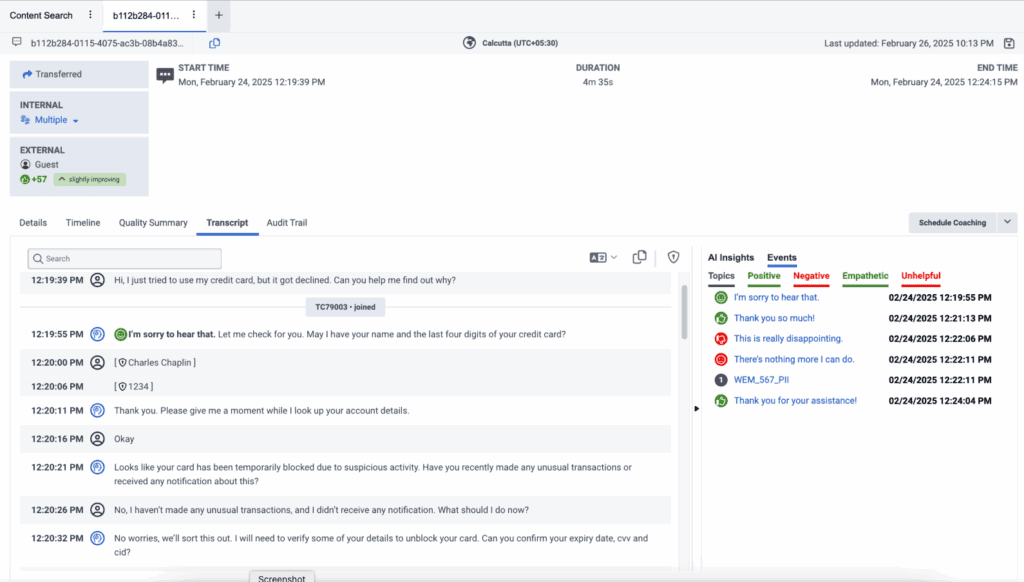
The following image represents a message transcript.
Click the image to enlarge.
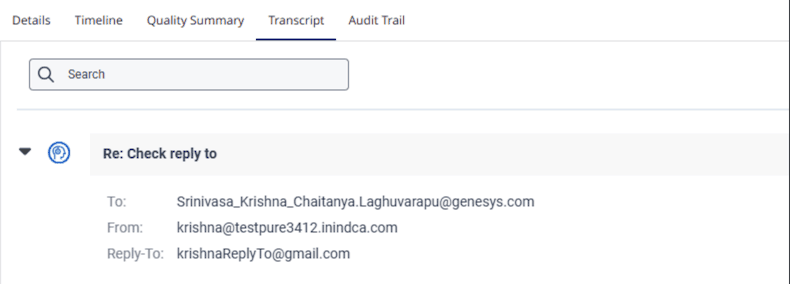
An email’s recording information appears inside the email. Recording information for an email appears in the Details tab.
- Click Performance > Workspace > Interactions.
- Click Menu > Analytics > Analytics Workspace.
- Click the Interactions tab.
- Click the row of the interaction whose transcript that you want to view.
- Click the Transcript tab.
- On the right side of the email, click the blue settings icon.
The recording information appears below the email title. For more information, see the Recording Information section in the View an interaction’s Details tab article.
- Enter the word or words that you want to find in the Search field of the Transcript tab.
- Press Enter.
- The Search field contains the number of instances the searched word or words appear in the transcript.
- When working with an email transcript that contains more than one email, the number of searched words found for the specific email, appears in the email title on the right.
- You can move from one found instance to another using the next and previous arrows in the Search field.
- Every instance of the searched word or words found in the transcript is highlighted with a yellow background.
- The word or words highlighted in orange indicate the current instance of the searched word or words, out of the total number of instances found in the transcript.
Email transcript UI
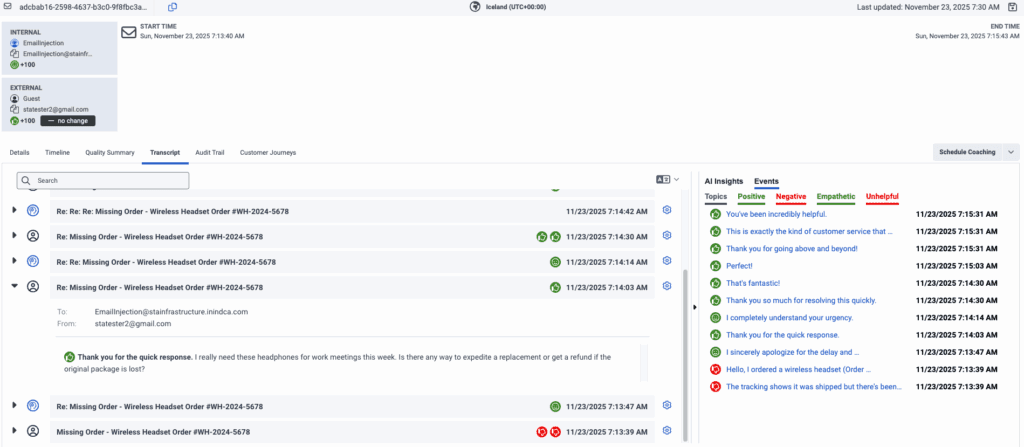
The words and sentences in the transcript are divided into customer and agent sections. On the left side of the page, every section includes a time stamp and an icon that indicates when the customer or the agent sent the message.
Customer:  Agent:
  ACD participant:
Click the image to enlarge.
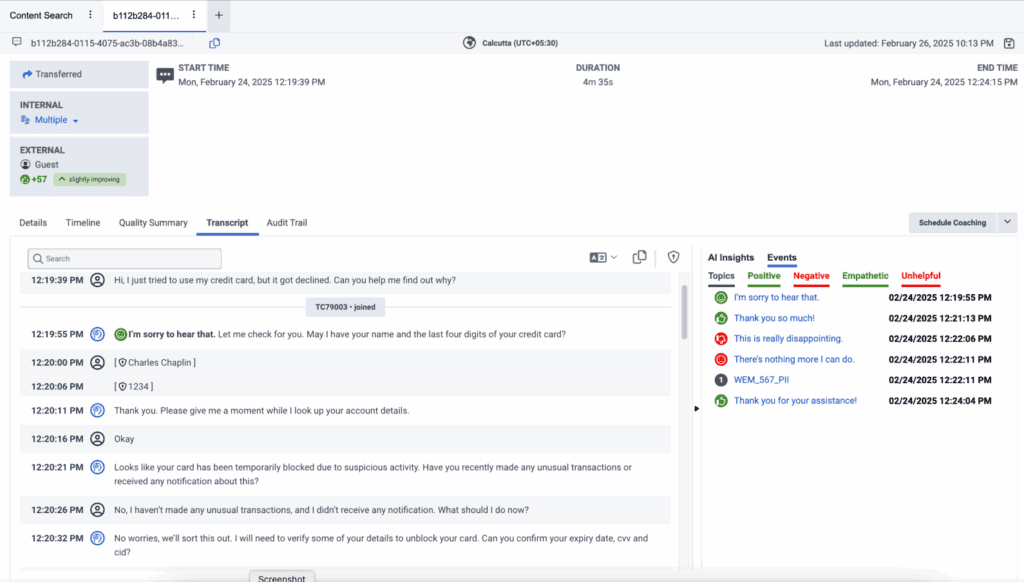
Notes:
- Within the message transcript, visual indicators provide information about the participant and program associated with the transcript content. For example, in the previous image, you can see when the participants James Bond and TC68964 joined and exited the message. These visual indicators (as shown in the following image) appear in the transcript at the moment the participant or program changes.
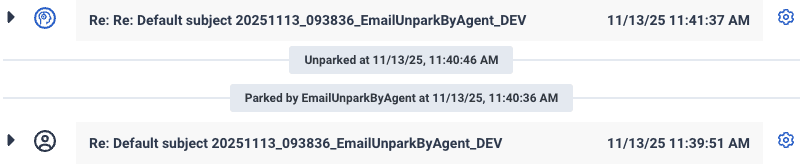
- Within an email transcript, there is a visual indicator about the program associated with the transcript content, dialect, park interaction, and unpark interaction.
- Within a digital transcript, a bot and a flow are represented by the same icon.
 To see the bot/flow section of the transcript, click the bot/flow header to expand the conversation.
- Click Performance > Workspace > Interactions.
- Click Menu > Analytics > Analytics Workspace.
- Click the Interactions tab.
- Click the row of the interaction whose transcript you want to view.
- Click the Transcript tab.
- Click the Copy Transcript option () in the upper right corner of the transcript.
- The Copy transcript option in a digital transcript is only available for message interaction.
- If a user does not have permission to view sensitive data, the sensitive data is masked.
- Genesys Cloud does not currently support directly highlighting and copying transcript text. Doing so may cause formatting issues. To copy transcript text reliably, use the Copy Transcript button in the UI.
The following metadata is copied.
- Interaction Type
- Interaction ID
- Message Type (only available for a message interaction)
- Start Time (User’s timezone)
- End Time (User’s timezone)
- Duration
- Internal Participant(s)
- External Participant(s)
- Transcript:
- Date/Time (User’s timezone)
- Participant Type (Internal/External)
- Participant
- Text
- Interaction Summary
- AI Insights
Key points:
- Availability
- The translation option is available on the Interaction Details page when a transcription is present and a dialect is available.
- Types of interactions supported
- Digital, and email interactions (body only) can be translated.
- Web messages: Apple, Facebook, Instagram, Open, SMS, WhatsAPP, Web Message, and X.
- Email interactions with an HTML toggle enabled are not supported.
- User interface elements
- A translation icon (which changes appearance when active) is displayed.
- A label at the top of the transcript panel indicates that translation is in progress and shows the source and target dialects.
- You can select a different target language via a drop-down menu, where languages are listed in their native scripts (for example, Hebrew appears as עברית).
- Considerations
- For digital interactions, approximately only the first 10,000 characters are translated.
- The feature is limited to 1,000 translations per organization per day.
- During translation, original text features like topic tags, search functionality, sentiment markers, and redactions behave differently. For example, copying the transcript always copies the original text.
- When a user does not have the View sensitive data permission and checks a transcript for translation, any redacted text in the original transcript is not translated.
Note: In some cases, the redacted entity name might appear in brackets if the translation service processes it that way. - After initial translation, the translated text will be cached for up to 20 hours, and visible after activating the translation icon.
Work with on demand transcription translation
- Navigate to the interaction that you want to review. Ensure that the interaction contains a transcription (digital message, or email body).
- Locate the translation icon
 . Within the transcript panel, look for the translation icon. This icon is visible only when a transcription is present.
 - Click or toggle the translation icon. Once activated, the icon changes its appearance to indicate that the translation process has started. A label appears at the top of the transcript panel, stating that the text is being translated from the source dialect to your selected target dialect.
- Wait for the translation to complete. A spinning icon appears (usually on the upper right of the interaction page) while the system processes the translation.
- Review the translated transcript. Once the translation is complete, the translated text appears underneath each line of the original transcript.
Some elements (for example, topic tags, sentiment markers, and search functionality) remain based on the original text. - Adjust the Target Language (if necessary). If the automatically selected target language is not your preferred dialect, click the drop-down menu in the translation area and choose your desired language. Languages in the drop-down appear in their native format (for example, Hebrew as עברית).
Disable translation
To revert to the original transcript, just toggle off the translation option. The translation label disappears, the icon returns to its original state, and the transcript displays the original language.
- Only new interactions are summarized.
- AI summarization requires that AI Insights be enabled for at least one program involved in an interaction’s transcript in order to generate a supervisor summary.
- Quality assurance
- Coaching and training
- Identifying trends in customer interactions
- To work with AI summarization, you must have AI Experience tokens and have Speech and Text Analytics (STA), Workforce Engagement Management (WEM), or GC3.
- The AI Insights section is only visible to customers who have:
- Required permissions
- AI experience tokens
- A WEM Add-On or GC3 subscription
- Users can collapse or expand the AI Insights panel based on preference, and this setting is relevant for all interactions.
- If suppression is enabled for IVR, hold, or queue wait times, transcripts do not generate for these segments. As a result, summaries do not include any content from these segments. Genesys recommends that you enable suppression during these segments to enhance customer privacy.
View AI-generated summaries
- Click Performance > Workspace > Interactions.
- Click Menu > Analytics > Analytics Workspace.
- Click the Interactions tab.
- Click the row of the interaction whose transcript you want to view.
- Click the Transcript tab, and select an interaction.
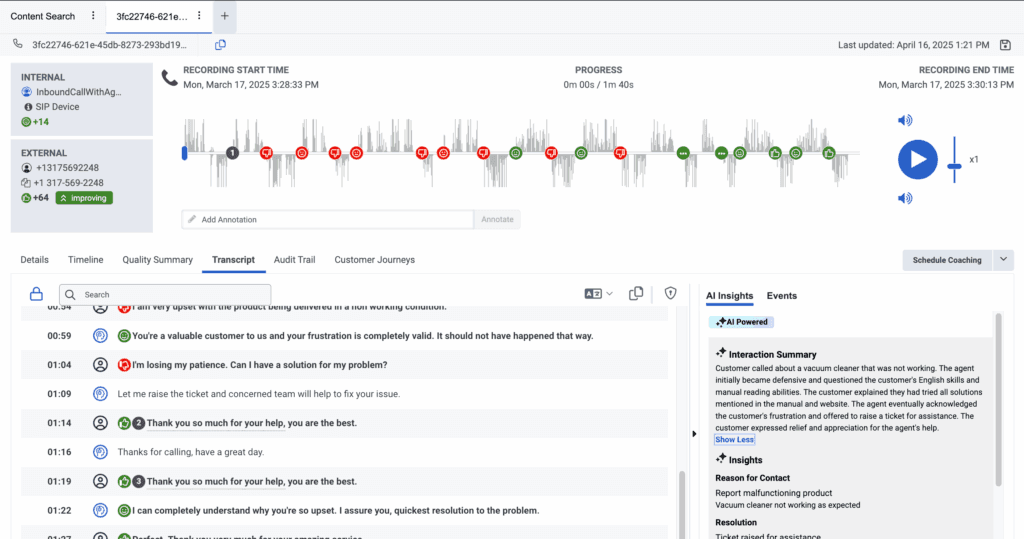
- Access the AI Insights tab next to Events, to display the interaction summary. If no AI Insights or Events exist, this panel remains closed by default.
- Review the AI summary:
- The AI summary provides a high-level overview of the entire interaction.
- If an interaction includes multiple agents, a single interaction-level summary is displayed.
Understanding AI summary indicators
- AI generated label: Summaries created by AI are marked as Generated by AI, with a tooltip.
- Multiple transcripts: If an interaction includes multiple transcripts, a tooltip explains that the summary is based on all available transcripts.
Key considerations and limitations
- AI summaries are available for messaging transcripts; email interactions are not summarized.
- Transcript length limitations
- Summaries are only generated for transcripts between 120 and 64000 characters.
- If a transcript exceeds this limit, it is not summarized, and a message appears to indicate that the limit has been exceeded.
- Data retention
- The AI summary follows the same retention policy as the recording and transcript.
- If a recording is deleted, the AI summary is also deleted.
- Transcript modifications
- If new transcripts are added or some are deleted from an interaction, the summary is regenerated.
- If all transcripts in an interaction are deleted, the summary and AI Insights are permanently removed.
Agent-level summaries provide AI-generated insights into the actions taken by both human and virtual agents during customer interactions. Supervisors can use these summaries to quickly review agent performance, making evaluations faster and more meaningful. The feature is available when Agent Copilot is enabled and associated with the queue, or when Virtual Agent is enabled in the flow. It applies across all interaction types giving supervisors a complete view of customer engagements. Both the AI-generated summary and any edits made by the agent are displayed, offering a transparent and accurate record of activity.

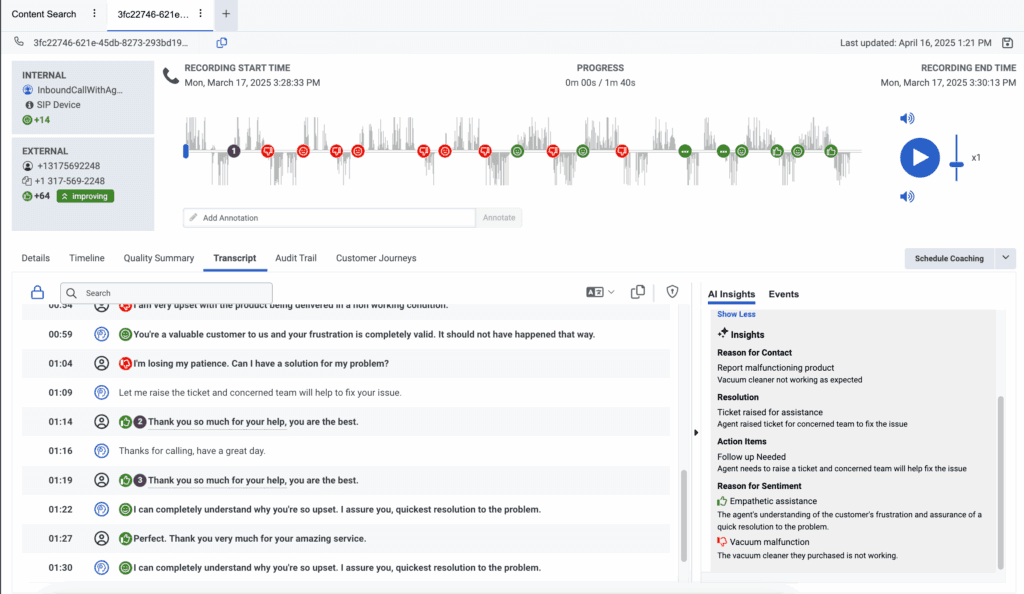
AI Insights equips contact center supervisors with a clear, structured view of each customer interaction, without the need to manually sift through transcripts or recordings. By automatically highlighting key elements of every conversation, it enables faster, more informed decision-making.
AI Insights delivers value through four core components:
- Reason for contact – AI automatically identifies the customer’s primary reason for reaching out (for example, billing inquiries, technical support, cancellations, or other concerns). Each interaction is tagged with a single, high-level contact reason, giving supervisors actionable insight into emerging trends and customer needs across their teams.
- Resolution status – Interactions are assessed for their outcomes and categorized as Resolved, Unresolved, or Partially Resolved. This enables supervisors to quickly identify unresolved issues that may require follow-up, and to spot coaching opportunities where agents could improve resolution rates.
- Action items – To ensure nothing gets overlooked, AI highlights important follow-up tasks, like updating customer records, sending confirmations, or escalating cases. This helps streamline post-call workflows and keeps teams aligned on next steps.
- Reasons for sentiment – Rather than just assigning a sentiment label (positive, neutral, or negative), AI Insights pinpoints the specific factors influencing how customers feel. It surfaces up to three positive and three negative sentiment drivers per interaction (for example, such as long wait times, agent empathy, policy friction, or product dissatisfaction), giving supervisors direct context into customer experience and emotional tone.
By combining these insights, Genesys Cloud helps contact center leaders proactively manage quality, coach effectively, and drive better outcomes at scale.
AI Insights empowers contact center supervisors to take faster, smarter action with clear, actionable intelligence from every interaction. Instead of reviewing entire transcripts, supervisors can:
- Understand customer intent and outcomes at a glance — Quickly see why customers reached out and whether their issues were resolved, partially resolved, or left open.
- Identify root causes of negative experiences — Pinpoint what’s driving dissatisfaction—such as long wait times, policy confusion, or product issues, without manually combing through calls.
- Provide more targeted coaching — Link customer sentiment to specific agent behaviors or interaction moments to deliver precise, effective feedback.
- Detect trends and friction points — Spot patterns across interactions, such as recurring complaints or process inefficiencies, that may be impacting customer satisfaction.
- Prioritize follow-ups intelligently — Focus on the cases that matter most by understanding both the outcome and the emotional drivers behind each interaction.
- AI summaries are available for messaging transcripts (email interactions are not summarized).
- Data retention
- The AI summary follows the same retention policy as the recording and transcript.
- If a recording is deleted, the AI summary is also deleted.
- Transcript modifications
- If new transcripts are added or some are deleted from an interaction, the summary is regenerated.
- If all transcripts in an interaction are deleted, the summary and AI Insights are permanently removed.
[NEXT] Was this article helpful?
Get user feedback about articles.