Format the header and footer in a customer survey form
- Genesys Cloud CX 3, Genesys Cloud CX 4, Genesys Cloud CX 1 WEM Add-on II, Genesys Cloud CX 2 WEM Add-on I, or Genesys Cloud EX license
- Quality > Survey Form > Add permission
- Quality > Survey Form > Delete permission
- Quality > Survey Form > Disable permission
- Quality > Survey Form > Edit permission
- Quality > Survey Form > View permission
When you create a customer survey form, use markdown to format the text in a survey form’s header and footer.
- Use inline formatting for words within a line or paragraph.
- Use image formatting to add images.
- Use paragraph formatting for the whole paragraph.
| Format | Use | For example, type this… | To send this… |
|---|---|---|---|
| Italic | Single asterisks or underscores (* or _) | Here is some *italic text* in a chat. (Or substitute underscores for the asterisks.) | Here is some italic text in a chat. |
| Bold | Double asterisks or underscores (** or __) | Here is some **bold text** in a chat. (Or substitute double underscores for the double asterisks.) | Here is some bold text in a chat. |
| Double tilde symbols (~~) | Here is some ~~strikethrough text~~ in a chat. | Here is some | |
Highlight | Backticks (`) | Here is some `highlighted text` in a chat. | Here is some highlighted text in a chat. |
| URL hyperlinks | Web address format Note: Make sure to add “http://” or “https://” to the link. | Check out http://www.genesys.com to see what we’re up to. | Check out http://www.genesys.com to see what we’re up to. |
| Custom hyperlinks |
Notes:
| Check out the [Resource Center]( "The Resource Center home page"). | Check out the . |
| Format | Use | For example, type this… | To show this… |
|---|---|---|---|
| Image |
|
|  |
| Format | Use | For example, type this… | To send this… |
|---|---|---|---|
| New Paragraph | Use one of the following:
| This is a paragraph in the header. \ This is a new paragraph in the header. —————————- This is a paragraph in the header. <enter><enter> This is a new paragraph in the header. | This is a paragraph in the header. This is a new paragraph in the header. —————————- This is a paragraph in the header. This is a new paragraph in the header. |
| Heading text | Number signs and a space
| # The Big Plan | 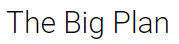 |
### The Big Plan | 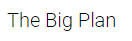 | ||
### The Big Plan |  | ||
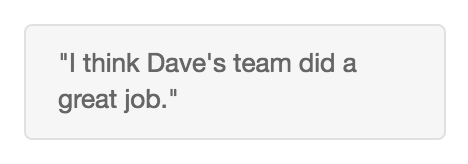
| Block quote | Greater than symbol | >”I think Dave’s team did a great job.” |
|
| Bulleted lists | For each item in the list, use an asterisk or hyphen and a space. | * Unnumbered list item 1 (Or substitute hyphens for asterisks.) |
|
| Numbered lists | For each item in the list, type the number one, a period, and a space. | 1. First do this. 1. Now do this. 1. Then do this. |
|
| Nested lists | Indent each list item with four spaces. | 1. First do this: <space><space><space><space>2. step 1 <space><space><space><space>3. step 2 * Also consider this: * option A * option a |
|
| Code block |
| ` ` `
printf(“Hello World”); } | #include
main()
{
printf("Hello World");
}
|
[NEXT] Was this article helpful?
Get user feedback about articles.